
Have you ever thought about how switches in a network keep different types of traffic separate even though all the devices share the same physical cables?
That magic happens through VLANs (Virtual Local Area Networks) and VLAN port tagging.
VLANs divide one physical network into multiple smaller, logical networks — improving performance, organization, and security.
But when VLANs span across multiple switches, port tagging becomes essential to ensure traffic knows where it belongs.
Let’s break it down step by step, using simple language and practical examples.
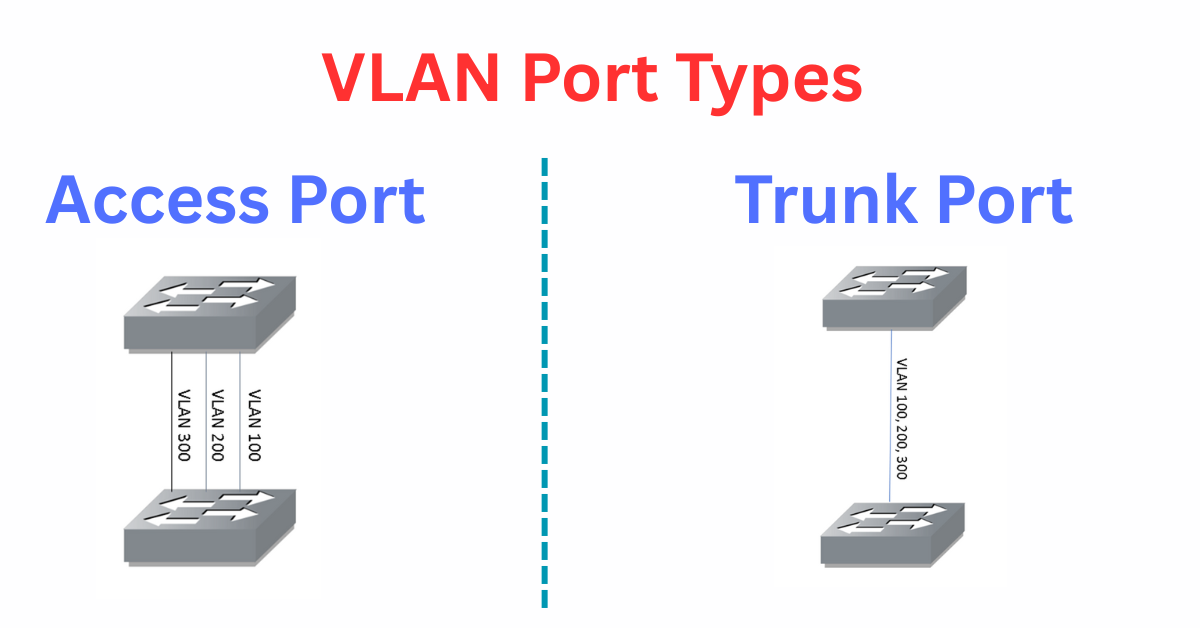
VLAN Port Types
A VLAN-enabled switch can have two kinds of ports:
- Access Ports
- Trunk Ports
Each port type plays a specific role in how devices connect and communicate within VLANs.
Access Ports – Connecting End Devices
An access port is the type of port used to connect end devices such as desktop PCs, printers, or IP phones to the network.
Key Points:
- An access port belongs to only one VLAN.
- Any device plugged into that port automatically joins that VLAN.
- The device doesn’t need to know about VLANs — it simply sends and receives regular Ethernet frames.
For instance, if Port 2 on a switch is assigned to VLAN 20, then the computer connected to that port becomes part of VLAN 20 automatically.
Tip: On Cisco switches, ports are access ports by default unless you manually configure them as trunk ports.
Extending VLANs Across Multiple Switches
Now imagine your organization uses multiple switches, and you want VLAN 20 to exist on all of them.
How can you connect these switches so they share the same VLANs?
There are two approaches:
- Use a separate physical link for each VLAN.
- Use one trunk connection that carries all VLANs together.
Let’s understand both options visually 👇
Multiple Uplinks – The Traditional Way
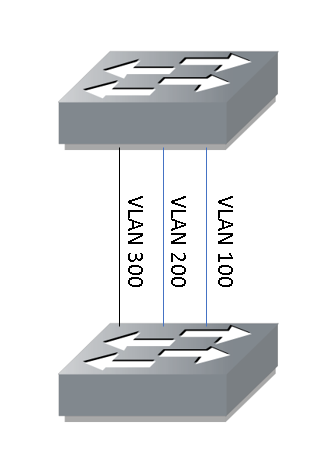
In older or smaller networks, administrators would run one cable per VLAN between switches.
For example:
- One link for VLAN 100
- One link for VLAN 200
- One link for VLAN 300
This setup works fine for two or three VLANs, but imagine doing that for ten or more VLANs — it quickly becomes impractical.
You would end up with a bundle of cables, wasted switch ports, and complex management.
Trunk Ports – The Modern and Smarter Way
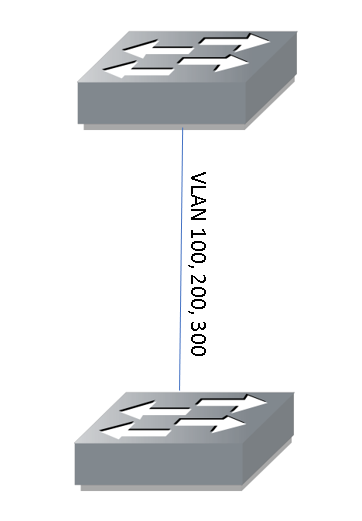
Instead of multiple physical connections, you can create one single trunk port between switches.
This trunk link can carry traffic for multiple VLANs at the same time — all through one cable.
This is made possible by VLAN tagging.
What Is VLAN Tagging?
When traffic leaves a switch through a trunk port, the switch adds a VLAN tag to each Ethernet frame.
This tag contains a VLAN ID, a small number that identifies which VLAN the frame belongs to.
For example:
- Frames from VLAN 100 are tagged as VLAN 100
- Frames from VLAN 200 are tagged as VLAN 200
- Frames from VLAN 300 are tagged as VLAN 300
When another switch receives these frames, it reads the tag, identifies the correct VLAN, and forwards the traffic accordingly.
When the traffic finally reaches an access port, the tag is removed (this is called untagging) so the end device only sees normal Ethernet traffic.
The Tagging Standard – IEEE 802.1Q
The most common tagging protocol used in modern networks is IEEE 802.1Q.
It adds a 4-byte VLAN tag into the Ethernet frame header to mark the VLAN number.
With this method, a single trunk link can carry traffic from hundreds or even thousands of VLANs — while still keeping them logically isolated.
Quick Comparison
| Feature | Access Port | Trunk Port |
| VLAN Membership | One VLAN only | Multiple VLANs |
| Frame Type | Untagged | Tagged (802.1Q) |
| Common Use | End devices (PCs, printers) | Switch-to-switch or router links |
| Default on Cisco Switches | Yes | No |
| Example Scenario | Connecting computers | Linking switches together |
Why VLAN Tagging Is Important
VLAN tagging offers several major advantages:
- Saves ports and cables — one trunk link can replace many physical connections.
- Improves scalability — easily add more VLANs without changing physical wiring.
- Enhances security — isolates traffic between different groups or departments.
- Simplifies management — less clutter, easier troubleshooting.
Without VLAN tagging, every VLAN would need its own dedicated cable between switches — a setup that just doesn’t scale in today’s large networks.
Summary –
VLAN port tagging is what allows multiple virtual networks to travel across the same physical connection — while keeping their data completely separate.
A single trunk port can carry dozens or even hundreds of VLANs efficiently, making it an essential concept in modern switched networks.
The next time you connect two switches with just one cable, remember – that simple wire could be carrying many VLANs at once, each identified by its own VLAN tag.
That’s the true power of VLAN port tagging!