
Understanding VTP (VLAN Trunking Protocol): The Backbone of VLAN Management
Introduction
Imagine you’re managing a large campus network with dozens of switches, each supporting multiple VLANs.
Now, think about the amount of manual work required to create or delete VLANs on every single switch one by one.
Sounds exhausting, right?
This is where VTP (VLAN Trunking Protocol) comes to the rescue!
It’s a Cisco proprietary protocol designed to simplify VLAN management by automatically propagating VLAN information across all connected switches in the same network.
Let’s break down what VTP is, why it’s needed, how it works, and what advantages (and a few risks) it brings to a network.
What is VTP?
VLAN Trunking Protocol (VTP) is a Cisco-developed protocol used to distribute and synchronize VLAN configuration information across multiple switches.
In simpler words — you configure VLANs on one switch, and all other switches in the same VTP domain automatically learn those VLANs.
VTP helps keep the VLAN database consistent throughout your network. It saves time, reduces manual configuration errors, and ensures that every switch shares the same VLAN information.
Why Do We Need VTP?
In a small network with two or three switches, manually creating VLANs on each switch isn’t a big deal.
But in a large enterprise network, where you might have dozens or even hundreds of switches, managing VLANs manually becomes a nightmare.
Let’s say you have 50 switches and you want to create a new VLAN (VLAN 200).
Without VTP, you would need to log in to each switch and configure that VLAN one by one.
That’s not just time-consuming — it’s also prone to human error.
VTP eliminates that pain.
Once you create or modify a VLAN on one switch (the VTP server), those changes automatically propagate to all other switches in the same VTP domain.
This ensures all switches are perfectly synchronized — no mismatched VLAN IDs or names.
Basic Working Principle of VTP
The working of VTP revolves around three key ideas:
- VTP Domain: A group of switches that share VLAN information.
- VTP Modes: Switches can operate as Server, Client, or Transparent (we’ll explore this in detail in the next blog).
- VTP Advertisements: Messages sent between switches to share VLAN database updates.
Here’s how it works step-by-step:
- You configure VLANs on a VTP server switch.
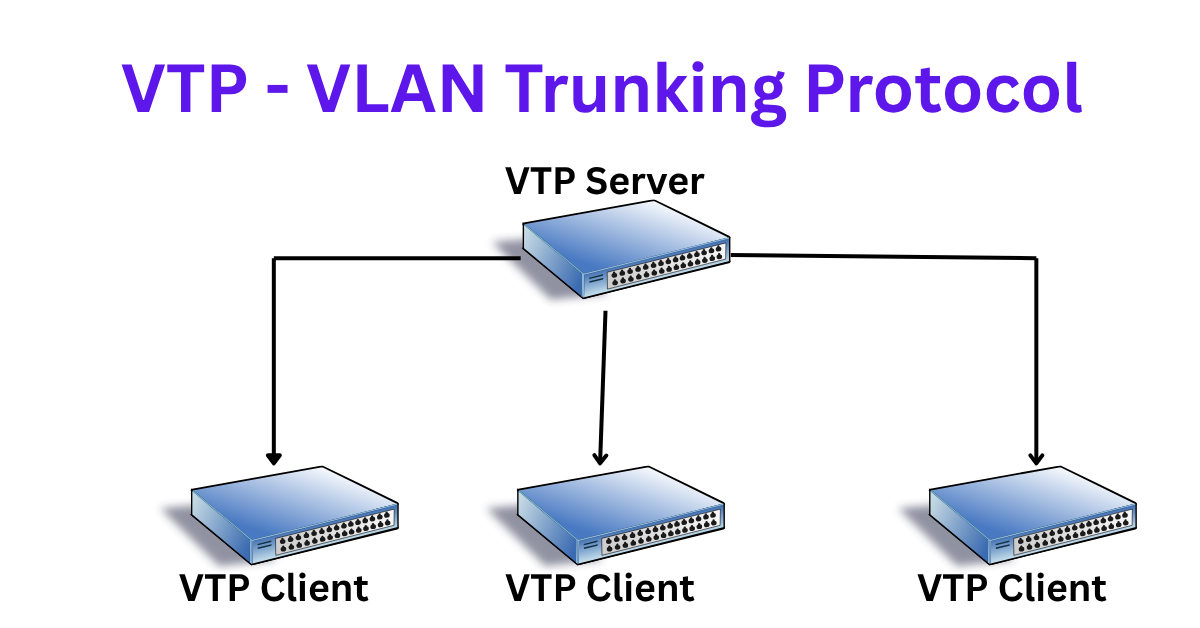
- That server then sends VTP advertisements through trunk links to other switches in the domain.
- The other switches (usually in client mode) receive these advertisements and update their VLAN database automatically.
This synchronization keeps your VLAN information consistent across all switches without manual effort.
Understanding the VTP Domain Concept
To participate in VTP, every switch must belong to a VTP domain — basically, a logical group that shares VLAN information.
- All switches within a domain must have the same domain name to exchange VLAN updates.
- A switch can only belong to one VTP domain at a time.
- The domain name is case-sensitive, so “CorpDomain” and “corpdomain” are considered different.
Think of the VTP domain as a closed community — only members of the same community can talk and share VLAN updates with each other.
Example Scenario – How VTP Simplifies VLAN Management
Let’s understand this with a practical example.
Imagine you have three switches:
- Switch A (VTP Server)
- Switch B (VTP Client)
- Switch C (VTP Client)
All three are part of the same VTP domain — say, “CORP_NET”.
Now, if you create a new VLAN 30 named Finance on Switch A, here’s what happens:
- Switch A updates its VLAN database.
- It sends a VTP advertisement out through its trunk ports.
- Switch B and C receive that update and automatically create VLAN 30 in their own databases.
That’s it — no manual configuration required on B and C.
Every switch in the VTP domain is now in sync!
Advantages of VTP
VTP offers several benefits that make network administration easier:
- Centralized VLAN Management:
Configure VLANs in one place and propagate them across the entire network. - Consistency:
Eliminates mismatched VLAN names or IDs between switches. - Reduced Configuration Time:
No need to manually add VLANs to every device. - Scalability:
Ideal for large networks with many interconnected switches. - Supports VLAN Pruning:
Helps reduce unnecessary VLAN traffic on trunk links (we’ll discuss this in a dedicated blog).
Risks and Limitations of VTP
While VTP simplifies life, it’s not risk-free.
If not handled carefully, it can cause major disruptions in your network.
Here’s why:
Each VTP domain uses a revision number to keep track of VLAN database versions.
When a switch with a higher revision number but an empty VLAN database joins the domain, it can overwrite the VLAN configuration on all other switches — causing VLANs to disappear!
This can lead to network outages, loss of connectivity, and a lot of panic.
To avoid this:
- Always reset the revision number of a new switch before adding it to the network.
- Double-check the VTP domain name and mode.
- Consider using VTPv3, which offers better protection through the primary and secondary server concept.
Summary
VTP is a powerful tool for managing VLANs efficiently across a network, especially in large environments.
It provides automation, consistency, and scalability — but must be configured with caution.
In the upcoming parts of this series, we’ll dive deeper into VTP versions, modes, advertisements, and configuration examples to give you a complete understanding of how to use it safely and effectively.