
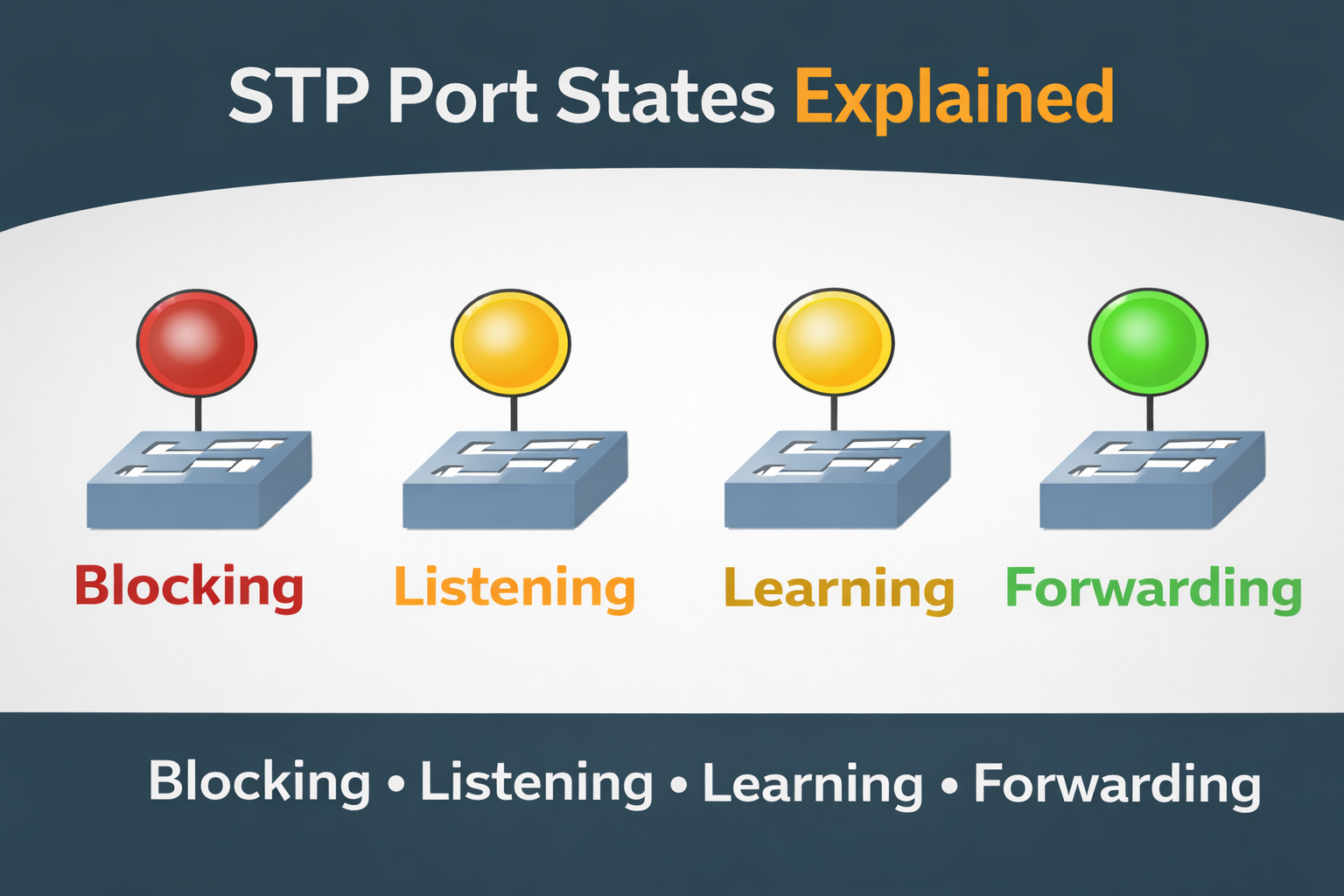
When people first learn Spanning Tree Protocol (STP), they usually focus on concepts like Root Bridge, Root Port, and Designated Port. However, many network issues related to STP are actually caused by misunderstanding STP port states.
STP port states define how and when a switch port is allowed to forward traffic.
These states are the reason STP is safe but sometimes slow.
In this blog, we will clearly understand:
- Why STP uses port states
- What each STP port state means
- How ports move from one state to another
- Why STP convergence takes time
All explanations are in simple English, without exam-style memorization.
Why STP Needs Port States
When a switch is powered on or when the network topology changes, STP cannot immediately allow ports to forward traffic. Doing so could temporarily create loops, which are far more dangerous than short delays.
So STP follows a slow and careful approach:
- First, it listens
- Then, it learns
- Only then, it forwards traffic
Each step is controlled using port states.
You can think of STP port states like traffic signals:
- Red → Stop
- Yellow → Get ready
- Green → Go
The Five STP Port States
Classic IEEE 802.1D STP defines five port states:
- Disabled
- Blocking
- Listening
- Learning
- Forwarding
Each state has a specific purpose.
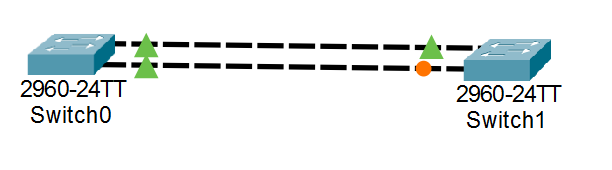
To understand STP port states, we will use the following topology. In this setup, two switches are connected using two physical links. This provides redundancy, but it also introduces a switching loop. To prevent the loop, Spanning Tree Protocol blocks one of the ports.
- Disabled State
A port in the Disabled state is:
- administratively shut down, or
- physically not operational
Key Characteristics
- Does not forward frames
- Does not learn MAC addresses
- Does not participate in STP
This state is not controlled by STP logic.
It simply means the port is not active.
2. Blocking State
The Blocking state is the first active STP state.
A port in Blocking state:
- does not forward data frames
- does not learn MAC addresses
- does receive BPDUs
Why Blocking Exists
Blocking is used to:
- prevent switching loops
- keep backup paths available
Ports that are neither Root Ports nor Designated Ports are placed into Blocking state.
Even though the port is blocked for data traffic, it still listens to STP messages so it can quickly react if the topology changes.
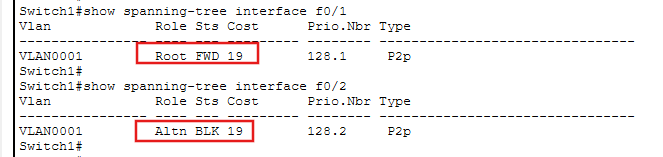
As shown in the image below, the switch port Fa0/2 moves into the blocking state.
3. Listening State
Once STP decides that a port might be needed, it moves the port into the Listening state.
In Listening state:
- the port does not forward data
- the port does not learn MAC addresses
- the port sends and receives BPDUs
Purpose of Listening State
The Listening state allows STP to:
- confirm port roles
- ensure no loops exist
- prepare the network for safe forwarding
This state exists purely for decision-making, not traffic forwarding.
4. Learning State
After Listening, the port enters the Learning state.
In Learning state:
- the port does not forward data
- the port starts learning MAC addresses
- the MAC table begins to populate
Why Learning Is Important
If a port forwarded traffic without learning MAC addresses:
- frames would be flooded unnecessarily
- network efficiency would drop
The Learning state allows the switch to build its MAC table safely before forwarding real traffic.
5. Forwarding State
The final and desired state is Forwarding.
A port in Forwarding state:
- forwards data frames
- learns MAC addresses
- sends and receives BPDUs
Root Ports and Designated Ports eventually reach this state after STP convergence.
Once a port is forwarding, it behaves like a normal switch port.
STP Timers and Port State Transitions
STP uses timers to control how long a port stays in each state.
Key timers:
- Hello Time (default 2 seconds)
- Forward Delay (default 15 seconds)
- Max Age (default 20 seconds)
Typical Transition Path
When a port becomes active, it follows this path:
Blocking → Listening → Learning → Forwarding
Each of the Listening and Learning states lasts 15 seconds by default.
So total convergence time is roughly:
30-50 seconds
Why Classic STP Is Slow
Classic STP was designed when:
- networks were smaller
- stability was more important than speed
The slow transitions ensure absolute loop prevention, but they also cause noticeable delays during:
- link failures
- switch reboots
- topology changes
This limitation later led to improved versions like Rapid Spanning Tree Protocol (RSTP).
Common Misunderstandings About STP Port States
- Blocking does not mean the port is dead
- Listening and Learning do not forward traffic
- A blocked port can quickly become active
- STP delay is intentional, not a flaw
Understanding these points helps greatly during troubleshooting.
Real-World Importance of STP Port States
Many real production issues happen because:
- engineers expect traffic to flow immediately
- ports are still in Listening or Learning
- applications time out during convergence
Knowing port states helps you:
- troubleshoot slow network recovery
- understand packet loss during topology changes
- design safer Layer-2 networks
Summary
STP port states are the safety mechanism that protects Ethernet networks from loops.
They ensure that switches take controlled, well-timed decisions before forwarding traffic.
Although modern networks often use faster protocols, understanding classic STP port states builds a strong foundation for:
- switching concepts
- Layer-2 troubleshooting
- advanced STP variants
If you understand why these states exist, STP will never feel confusing again.